
'%3e%3cpath%20fill-rule='evenodd'%20clip-rule='evenodd'%20d='M6.99935%2012.8327C10.221%2012.8327%2012.8327%2010.221%2012.8327%206.99935C12.8327%203.77769%2010.221%201.16602%206.99935%201.16602C3.77769%201.16602%201.16602%203.77769%201.16602%206.99935C1.16602%2010.221%203.77769%2012.8327%206.99935%2012.8327Z'%20stroke='%23666666'%20stroke-linecap='round'%20stroke-linejoin='round'/%3e%3cpath%20d='M1.16602%207H12.8327'%20stroke='%23666666'%20stroke-linecap='round'%20stroke-linejoin='round'/%3e%3cpath%20fill-rule='evenodd'%20clip-rule='evenodd'%20d='M6.99935%2012.8327C8.28802%2012.8327%209.33268%2010.221%209.33268%206.99935C9.33268%203.77769%208.28802%201.16602%206.99935%201.16602C5.71068%201.16602%204.66602%203.77769%204.66602%206.99935C4.66602%2010.221%205.71068%2012.8327%206.99935%2012.8327Z'%20stroke='%23666666'%20stroke-linecap='round'%20stroke-linejoin='round'/%3e%3cpath%20d='M2.875%202.95898C3.93063%204.01461%205.38896%204.66754%206.99978%204.66754C8.61062%204.66754%2010.069%204.01461%2011.1246%202.95898'%20stroke='%23666666'%20stroke-linecap='round'%20stroke-linejoin='round'/%3e%3cpath%20d='M11.1246%2011.0425C10.069%209.98691%208.61062%209.33398%206.99978%209.33398C5.38896%209.33398%203.93063%209.98691%202.875%2011.0425'%20stroke='%23666666'%20stroke-linecap='round'%20stroke-linejoin='round'/%3e%3c/g%3e%3cdefs%3e%3cclipPath%20id='clip0_1267_9109'%3e%3crect%20width='14'%20height='14'%20fill='white'/%3e%3c/clipPath%3e%3c/defs%3e%3c/svg%3e)


Wie man Dateien mit digitaler Signatur per E-Mail versendet (Vollständige Anleitung zum Versenden von Umschlägen mit eSignGlobal)


Wenn Sie einen Vertrag/ein Formular (häufig als PDF) per E-Mail erhalten und diesen schnell online unterzeichnen möchten, bietet dieser Artikel einen Standardpfad von E-Mail-Anhang → eSignGlobal-Umschlag → Unterzeichnung und Aufbewahrung, der Anforderungen wie Einzel-/Mehrfachdokumente, zeitversetzte Zustellung und sequenzielle Genehmigung abdeckt.
Inhaltsverzeichnis
- 1) Anwendungsbereiche des Tutorials
- 2) Grundlegender Ablauf: Von der E-Mail zum "Senden eines Umschlags"
- 3) Wichtige Parameter und Einschränkungen (Schnellübersicht)
- 4) Erweiterte Funktionen: Massenversand / Zeitgesteuerter Versand / Verschieben der Unterzeichnungsreihenfolge
- 5) SES-Rechtmäßigkeit und Compliance-Modell (EU/US/HK/SG)
- 6) Häufig gestellte Fragen (FAQ)
- 7) Über eSignGlobal: Positionierung und Vorteile
1) Anwendungsbereiche des Tutorials
- Sie haben eine PDF-Datei (oder ein Dokument, das zuerst als PDF exportiert werden muss) per E-Mail erhalten, die unterzeichnet werden muss.
- Sie müssen den Hauptvertrag und Anhänge/Zusatzblätter auf einmal versenden, um die Abschlussrate und Rückverfolgbarkeit zu verbessern.
- Es bestehen Anforderungen an zeitversetzte, feste Rhythmus-basierte Zustellung oder es muss eine klare Unterzeichnungsreihenfolge/Genehmigungskette eingehalten werden.
2) Grundlegender Ablauf: Von der E-Mail zum "Senden eines Umschlags"
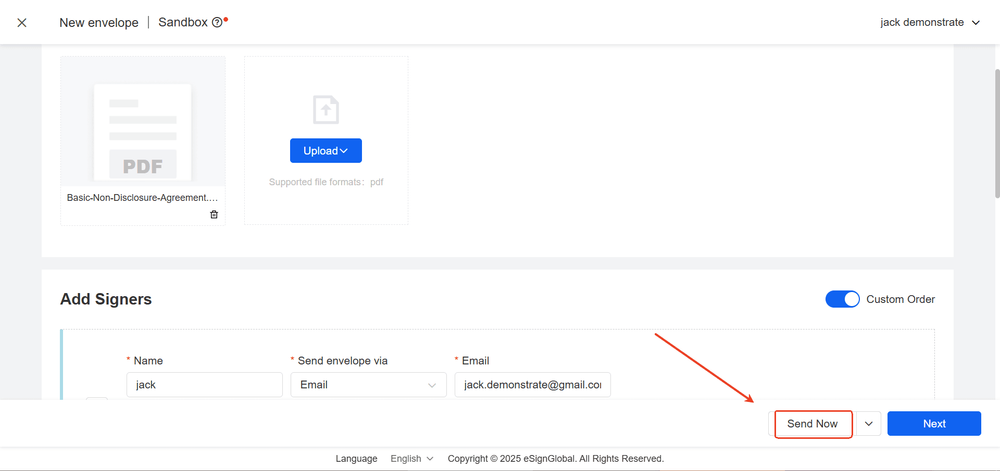
Schritt A: Hochladen und Organisieren von Dateien
- Laden Sie den zu unterzeichnenden PDF-Anhang aus der E-Mail herunter.
- Melden Sie sich bei eSignGlobal an → Gehen Sie zur Seite Umschlag senden.
- Dokument hinzufügen: Laden Sie die PDF-Datei hoch (Einzeldatei ≤30MB; Jeder Umschlag ≤10 Dateien).
Schritt B: Hinzufügen von Unterzeichnern und grundlegenden Informationen
- Unterzeichner hinzufügen: Geben Sie für jeden Unterzeichner Name + E-Mail ein (Pro Umschlag ≤10 Personen).
- Grundlegende Informationen: Geben Sie Betreff und Hinweis ein.
Schritt C: Erweiterte Einstellungen und Platzierung von Feldern
- Erweiterte Einstellungen: Legen Sie Vertragslaufzeit (≤90 Tage), CC (≤10 Personen), Anhänge (≤10 Dateien) fest → Weiter.
- Felder hinzufügen: Ziehen Sie Signatur/Datum/Text/Kontrollkästchen/Optionsfeld → Senden.
- Das System benachrichtigt automatisch; Verfolgen Sie den Status auf der Listenseite und laden Sie das fertige Produkt und das Zertifikat herunter.
3) Wichtige Parameter und Einschränkungen (Schnellübersicht)
- Datei: PDF; Einzeldatei ≤30MB; Maximal 10 Dateien pro Umschlag.
- Unterzeichner: Maximal 10 Personen pro Umschlag; Unterstützt sequenzielle Signatur (seriell/parallel/gemischt).
- Erweiterte Einstellungen: Laufzeit ≤90 Tage; CC ≤10 Personen; Anhänge ≤10 Dateien.
4) Erweiterte Funktionen: Massenversand / Zeitgesteuerter Versand / Unterzeichnungsreihenfolge
4.1 Massenversand (geeignet für "Eine Vorlage × Mehrere Empfänger")
Szenario: Einstellungsunterlagen, Richtlinieninformationen, Vertriebsvereinbarungen, jährliche Compliance-Bestätigungen usw.
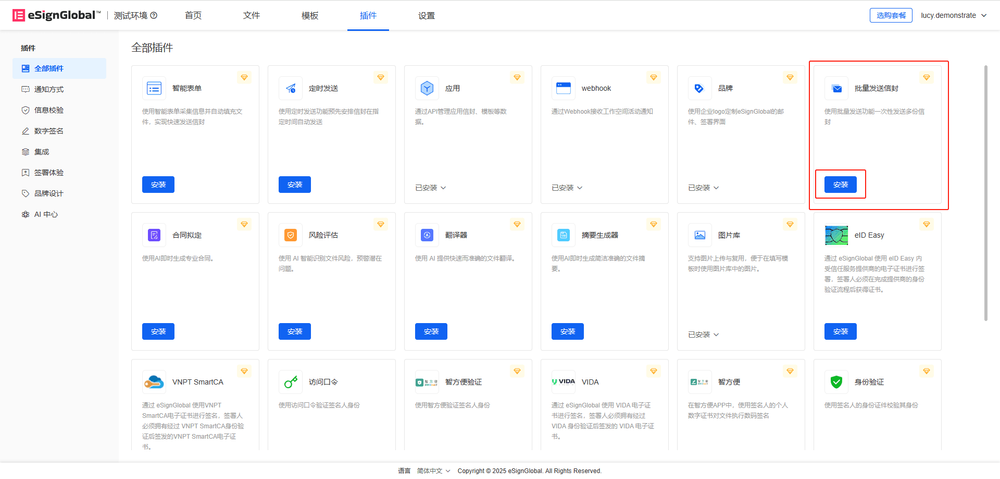
Bedienung: Installieren Sie Massenversand von Umschlägen → Wählen Sie auf der rechten Seite der Versandseite Massenversand von Umschlägen aus dem Dropdown-Menü → Laden Sie Vorlagen/Dateien hoch und konfigurieren Sie Unterzeichner und Validierung → Laden Sie die CSV-Beispieldatei herunter und füllen Sie Unterzeichner/CC, Betreff, Hinweis aus → Laden Sie die CSV-Datei hoch → Legen Sie die Unterzeichnungsbereiche fest → Sofort senden → Überprüfen Sie den Fortschritt unter Massendateien und exportieren Sie den Sendestatus.
4.2 Zeitgesteuerter Versand (zeitversetzte und einheitliche Zustellung)
Szenario: Zeitversetzte Teams, Erreichbarkeit während der Arbeitszeit, Anpassung an den Geschäftsrhythmus.
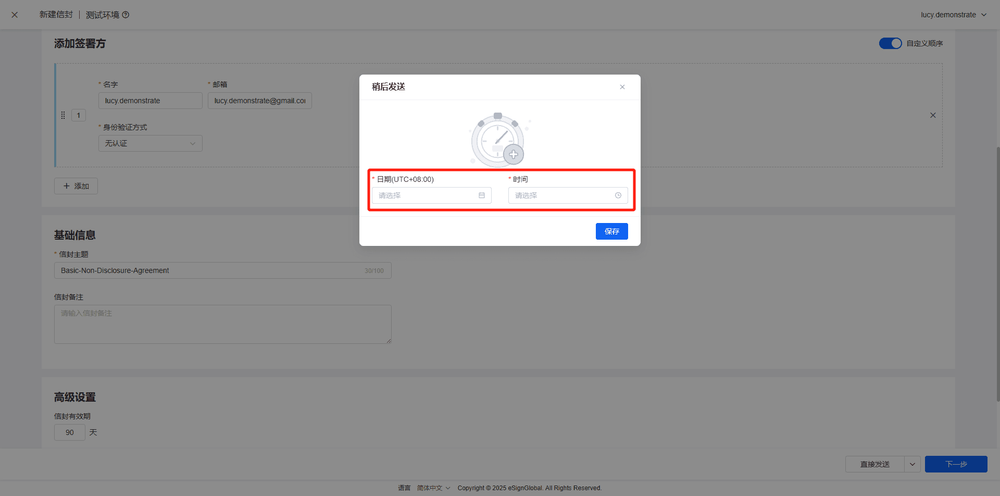
Bedienung: Installieren Sie Zeitgesteuerter Versand → Wählen Sie auf der Startseite im Dropdown-Menü neben "Direkt senden" die Option "Später senden" (Datum/Uhrzeit festlegen) → Oder wählen Sie auf der Seite zur Angabe der Unterzeichnungsposition im Dropdown-Menü neben "Sofort senden" die Option "Später senden" (Datum/Uhrzeit festlegen).
4.3 Festlegen der Unterzeichnungsreihenfolge (seriell/parallel/gemischt)
Festlegen der Unterzeichnungsreihenfolge: Gleiche Nummer = parallel, Unterschiedliche Nummer = seriell; Unterstützt sequentielle/nicht-sequentielle Signatur, Mehrschrittige Signatur durch denselben Unterzeichner, Neuanordnung mehrerer Dateien per Drag & Drop.
5) SES-Rechtmäßigkeit und Compliance-Modell (EU/US/HK/SG)
SES-Definition: Leichte Methoden wie Eingabe des Namens, Ankreuzen der Zustimmung, handschriftliche Spur oder Hochladen eines Signaturbildes, die nicht die Anforderungen von AdES/QES an Zertifikate/kontrollierte Geräte erfüllen. Schlüsselelemente: Zustimmung, Unterzeichnungsabsicht, Dateiintegrität, Rückverfolgbarkeit (Zeitstempel, IP/UA, Betriebsprotokolle), Aufbewahrbarkeit.
Wichtige Rechtsordnungen:
- EU (eIDAS): Die Gültigkeit darf nicht aufgrund von "elektronischer Form/Nicht-QES" verweigert werden; QES hat die stärkste Vermutung der Gleichwertigkeit mit der handschriftlichen Unterschrift.
- USA (E-SIGN/UETA): Die Gültigkeit darf nicht aufgrund der elektronischen Form verweigert werden; Im Verbraucherkontext ist eine elektronische Zustellung/Zustimmung erforderlich.
- Hongkong (ETO): Zuverlässige Signaturen werden im privaten Handel anerkannt; Regierungsangelegenheiten erfordern oft eine anerkannte digitale Signatur.
- Singapur (ETA): Erkennt elektronische Signaturen an; Digitale/spezifische sichere Signaturen haben einen stärkeren Status.
Wann aufrüsten: Hohe Beträge/hohes Risiko/starke Regulierung; Benötigt die Vermutung der Gleichwertigkeit mit der handschriftlichen Unterschrift; Gegenpartei/Gesetze erfordern qualifizierte Zertifikate und kontrollierte Geräte. Praxis: Verwenden Sie SES für reguläre kommerzielle Angelegenheiten; Fügen Sie bei hohem Risiko Zugangspasswörter/OTP/Dokumente/Gesichtserkennung, Zertifikate/Siegel, Zeitstempel/Hashes und Beweispakete hinzu.
6) Häufig gestellte Fragen (FAQ)
F1: Können Nicht-PDF-Dateien signiert werden? Exportieren Sie zuerst als PDF und laden Sie es dann hoch. F2: Können Hauptvertrag + Anhänge gebündelt werden? Ja, maximal 10 Dateien/Umschlag, wodurch eine einzige vollständige Audit-Kette erstellt wird. F3: Wie funktionieren zeitgesteuerte und Erinnerungen zusammen? Verwenden Sie "Später senden" + Frist/automatische Erinnerung; Verwenden Sie "Erneut senden", um nicht abgeschlossene Personen zu erinnern. F4: Wie kann man Genehmigung und Effizienz in Einklang bringen? Verwenden Sie die Unterzeichnungsreihenfolge (parallel/seriell/gemischt), bei Bedarf mehrere Schritte für denselben Unterzeichner.
7) Über eSignGlobal: Positionierung und Vorteile
eSignGlobal = Lokalisierter asiatischer Dienstleister · Ausgezeichnete Alternative zu DocuSign · Günstigerer Preis
- Lokalisierte Compliance (HK ETO, SG ETA usw.); Mehrsprachigkeit und vollständige Beweise.
- Bessere TCO (Abonnements und Mehrwertdienste sind kostengünstiger).
- Skalierbarkeit: Massenversand, zeitgesteuerter Versand, Reihenfolge, Vorlagen, Berechtigungen, API/Webhook.
- Identität und Beweise: Passwort/SMS/Dokument/Gesichtserkennung, Zeitstempel/Hash, vollständige Audits und Beweispakete.
