
'%3e%3cpath%20fill-rule='evenodd'%20clip-rule='evenodd'%20d='M6.99935%2012.8327C10.221%2012.8327%2012.8327%2010.221%2012.8327%206.99935C12.8327%203.77769%2010.221%201.16602%206.99935%201.16602C3.77769%201.16602%201.16602%203.77769%201.16602%206.99935C1.16602%2010.221%203.77769%2012.8327%206.99935%2012.8327Z'%20stroke='%23666666'%20stroke-linecap='round'%20stroke-linejoin='round'/%3e%3cpath%20d='M1.16602%207H12.8327'%20stroke='%23666666'%20stroke-linecap='round'%20stroke-linejoin='round'/%3e%3cpath%20fill-rule='evenodd'%20clip-rule='evenodd'%20d='M6.99935%2012.8327C8.28802%2012.8327%209.33268%2010.221%209.33268%206.99935C9.33268%203.77769%208.28802%201.16602%206.99935%201.16602C5.71068%201.16602%204.66602%203.77769%204.66602%206.99935C4.66602%2010.221%205.71068%2012.8327%206.99935%2012.8327Z'%20stroke='%23666666'%20stroke-linecap='round'%20stroke-linejoin='round'/%3e%3cpath%20d='M2.875%202.95898C3.93063%204.01461%205.38896%204.66754%206.99978%204.66754C8.61062%204.66754%2010.069%204.01461%2011.1246%202.95898'%20stroke='%23666666'%20stroke-linecap='round'%20stroke-linejoin='round'/%3e%3cpath%20d='M11.1246%2011.0425C10.069%209.98691%208.61062%209.33398%206.99978%209.33398C5.38896%209.33398%203.93063%209.98691%202.875%2011.0425'%20stroke='%23666666'%20stroke-linecap='round'%20stroke-linejoin='round'/%3e%3c/g%3e%3cdefs%3e%3cclipPath%20id='clip0_1267_9109'%3e%3crect%20width='14'%20height='14'%20fill='white'/%3e%3c/clipPath%3e%3c/defs%3e%3c/svg%3e)


Adobe Acrobat Sign vs eSignGlobal: Confronto approfondito delle funzionalità e dei processi di invio di buste


Questo articolo confronta in dettaglio Adobe Acrobat Sign ed eSignGlobal in termini di invio massivo (Bulk), invio programmato (Scheduled), ordine di firma (Signing Order), prove e conformità, API e operazioni, per aiutare i team a completare il ciclo dalla selezione all'implementazione.
Indice
- 1) Lettura rapida delle conclusioni
- 2) Matrice delle funzionalità principali
- 3) Scenari aziendali tipici
- 4) Punti chiave del processo di invio generico
- 5) Conformità e prove (Panoramica SES)
- 6) Costi e integrazione
- 7) Elenco di implementazione (Checklist)
- 8) Suggerimenti per la selezione
1) Lettura rapida delle conclusioni
- Entrambi possono completare stabilmente l'avvio tramite pagina web + il posizionamento dei campi;
- eSignGlobal è più intuitivo in termini di percorso operativo, dashboard di avanzamento ed esportazione dello stato per Bulk / Scheduled / Signing Order;
- eSignGlobal fornisce una consegna completa per password di accesso / SMS / documenti d'identità / riconoscimento facciale, timestamp / hash / log delle operazioni / pacchetto di prove;
- Se l'organizzazione ha già adottato l'ecosistema e i modelli di Adobe Acrobat Sign, può continuare a espandersi all'interno del suo sistema.
2) Matrice delle funzionalità principali (Panoramica)
| Dimensione | Adobe Acrobat Sign | eSignGlobal |
|---|---|---|
| Avvio e modelli | Avvio tramite pagina web, modelli e campi maturi | Maturità di pari livello; terminologia adatta ai team bilingue |
| Invio massivo (Bulk) | Modello + CSV | Modello + CSV; Dashboard di avanzamento + Esportazione dello stato |
| Invio programmato (Scheduled) | Pianificazione (a seconda dell'abbonamento) | Possibilità di "Invia più tardi" sia nella pagina di avvio che nella pagina dei campi |
| Ordine di firma (Routing) | Seriale/Parallelo/Misto | Seriale/Parallelo/Casuale, Più passaggi per lo stesso firmatario, Riordino dei file tramite trascinamento |
| Autenticazione dell'identità | Multifattoriale (a seconda del piano) | Combinazione di password di accesso / SMS / documenti d'identità / riconoscimento facciale |
| Prove e audit | Log di audit, certificati | Download integrato di timestamp, hash, log, pacchetto di prove |
| API & Webhook | Ecosistema/Mercato ricco | Interfaccia semplice, facile da integrare con sistemi HR/CRM/ERP/contrattuali |
3) Scenari aziendali tipici
3.1 Un modello × Destinatari multipli (Pacchetto di onboarding, comunicazione delle politiche, conformità annuale)
- Adobe Acrobat Sign: Una volta compresa la mappatura modello-CSV, è possibile eseguire l'invio massivo senza problemi.
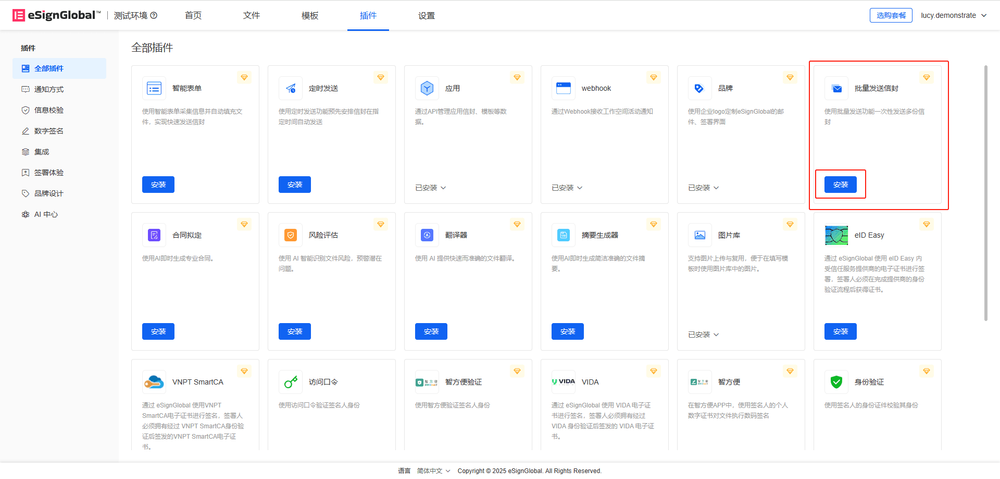
- eSignGlobal: Selezionare Invio massivo nella pagina di invio → Scaricare il CSV di esempio → Caricare e convalidare → Visualizzare in anteprima a campione le variabili e i campi → Monitorare l'avanzamento ed esportare lo stato in File massivi.
3.2 Fuso orario multiplo/Distribuzione uniforme (Coordinamento della sede centrale, lancio simultaneo a livello regionale)
- Adobe Acrobat Sign: Fornisce funzionalità di pianificazione.
- eSignGlobal: Possibilità di "Invia più tardi" sia nella pagina di avvio che nella pagina dei campi; combinato con data di scadenza + promemoria automatico per ottenere una copertura a finestra.
3.3 Approvazione rigorosa + Conferma parallela (Routing ibrido)
- Adobe Acrobat Sign: Supporta seriale e parallelo.
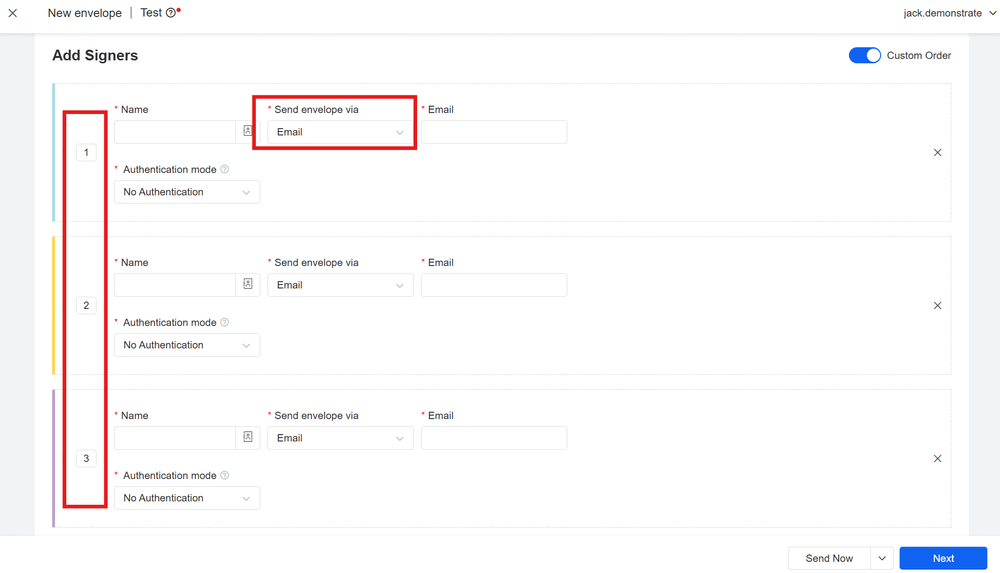
- eSignGlobal: Stesso numero di sequenza = parallelo, numero di sequenza diverso = seriale; possibilità di passare alla firma casuale, più passaggi per lo stesso firmatario, riordino dei file tramite trascinamento, formando una sequenza "parallelo → seriale → parallelo".
4) Punti chiave del processo di invio generico
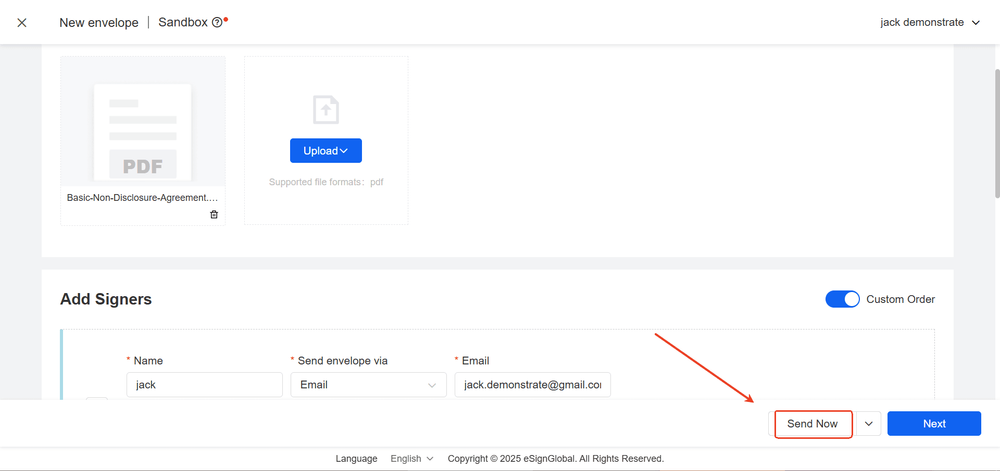
Aggiungere documento (DOCX o esportare PDF) → Aggiungere firmatario/CC → Impostare data di scadenza/promemoria/allegati/password di accesso → Posizionamento dei campi (firma/data/testo/casella di controllo/pulsante di opzione/menu a tendina) → Invia e traccia (rinvia solleciti, scarica prodotto finito e pacchetto di prove).
5) Conformità e prove (Panoramica SES)
- SES: Inserire il nome, selezionare l'accettazione, traccia scritta a mano, caricare l'immagine della firma;
- Elementi: Intento/Consenso, Integrità, Tracciabilità (timestamp/IP/UA/log), Conservazione;
- Giurisdizione: EU eIDAS, US E-SIGN/UETA, HK/SG ecc. riconoscono generalmente la firma elettronica;
- Pratica: SES per transazioni commerciali ordinarie + password di accesso/SMS; sovrapporre documenti d'identità/riconoscimento facciale e certificati/sigilli per alto rischio; conservare il pacchetto di prove.
6) Costi e integrazione
- Adobe Acrobat Sign: Ecosistema completo, il costo totale è influenzato dal piano e dai moduli aggiuntivi;
- eSignGlobal: API/Webhook semplici, operazioni intuitive, l'importazione e la manutenzione della manodopera sono più controllabili.
7) Elenco di implementazione (Checklist)
Variabili del modello = Nomi delle colonne CSV; Eseguire una piccola prova di esempio di 5-10 righe prima dell'invio massivo; Combinazione di invio massivo × programmato × sequenziale; Abilitare l'autenticazione a più fattori in base al rischio; Integrare con sistemi HR/CRM/ERP/contrattuali tramite API/Webhook; Monitorare il tasso di apertura/tasso di completamento/durata della firma nella dashboard.
8) Suggerimenti per la selezione
Se sei interessato a operazioni di invio massivo, flessibilità di pianificazione, routing chiaro, consegna delle prove e costi di integrazione, l'implementazione di send envelope di eSignGlobal è più semplice, soprattutto per gli utenti dell'Asia-Pacifico; se hai già utilizzato a fondo l'ecosistema di Adobe Acrobat Sign, è fattibile continuare con il suo sistema.
