
'%3e%3cpath%20fill-rule='evenodd'%20clip-rule='evenodd'%20d='M6.99935%2012.8327C10.221%2012.8327%2012.8327%2010.221%2012.8327%206.99935C12.8327%203.77769%2010.221%201.16602%206.99935%201.16602C3.77769%201.16602%201.16602%203.77769%201.16602%206.99935C1.16602%2010.221%203.77769%2012.8327%206.99935%2012.8327Z'%20stroke='%23666666'%20stroke-linecap='round'%20stroke-linejoin='round'/%3e%3cpath%20d='M1.16602%207H12.8327'%20stroke='%23666666'%20stroke-linecap='round'%20stroke-linejoin='round'/%3e%3cpath%20fill-rule='evenodd'%20clip-rule='evenodd'%20d='M6.99935%2012.8327C8.28802%2012.8327%209.33268%2010.221%209.33268%206.99935C9.33268%203.77769%208.28802%201.16602%206.99935%201.16602C5.71068%201.16602%204.66602%203.77769%204.66602%206.99935C4.66602%2010.221%205.71068%2012.8327%206.99935%2012.8327Z'%20stroke='%23666666'%20stroke-linecap='round'%20stroke-linejoin='round'/%3e%3cpath%20d='M2.875%202.95898C3.93063%204.01461%205.38896%204.66754%206.99978%204.66754C8.61062%204.66754%2010.069%204.01461%2011.1246%202.95898'%20stroke='%23666666'%20stroke-linecap='round'%20stroke-linejoin='round'/%3e%3cpath%20d='M11.1246%2011.0425C10.069%209.98691%208.61062%209.33398%206.99978%209.33398C5.38896%209.33398%203.93063%209.98691%202.875%2011.0425'%20stroke='%23666666'%20stroke-linecap='round'%20stroke-linejoin='round'/%3e%3c/g%3e%3cdefs%3e%3cclipPath%20id='clip0_1267_9109'%3e%3crect%20width='14'%20height='14'%20fill='white'/%3e%3c/clipPath%3e%3c/defs%3e%3c/svg%3e)


How can I check if my certificate is valid?


How Can I Check If My Certificate Is Valid?
In today’s digital business environment, electronic signatures and digital certificates have become integral to secure, legally binding communications. Whether you're signing contracts, submitting government paperwork, or processing forms online, it's important to ensure that the digital certificate used is valid and compliant with your local regulations.
This guide explains how to check if your certificate is valid and why verification matters—especially in jurisdictions like Hong Kong or across Southeast Asia where regulatory compliance is key to avoiding delays and legal risks.
What Is a Digital Certificate?
A digital certificate is an electronic “passport” used to verify the identity of parties in digital communications. It is issued by a Certificate Authority (CA) and binds an individual, organization, or device’s identity to a pair of cryptographic keys.
Key components of a digital certificate include:
- Certificate holder’s public key
- Issuer (CA name)
- Expiration date
- Digital signature of the issuer
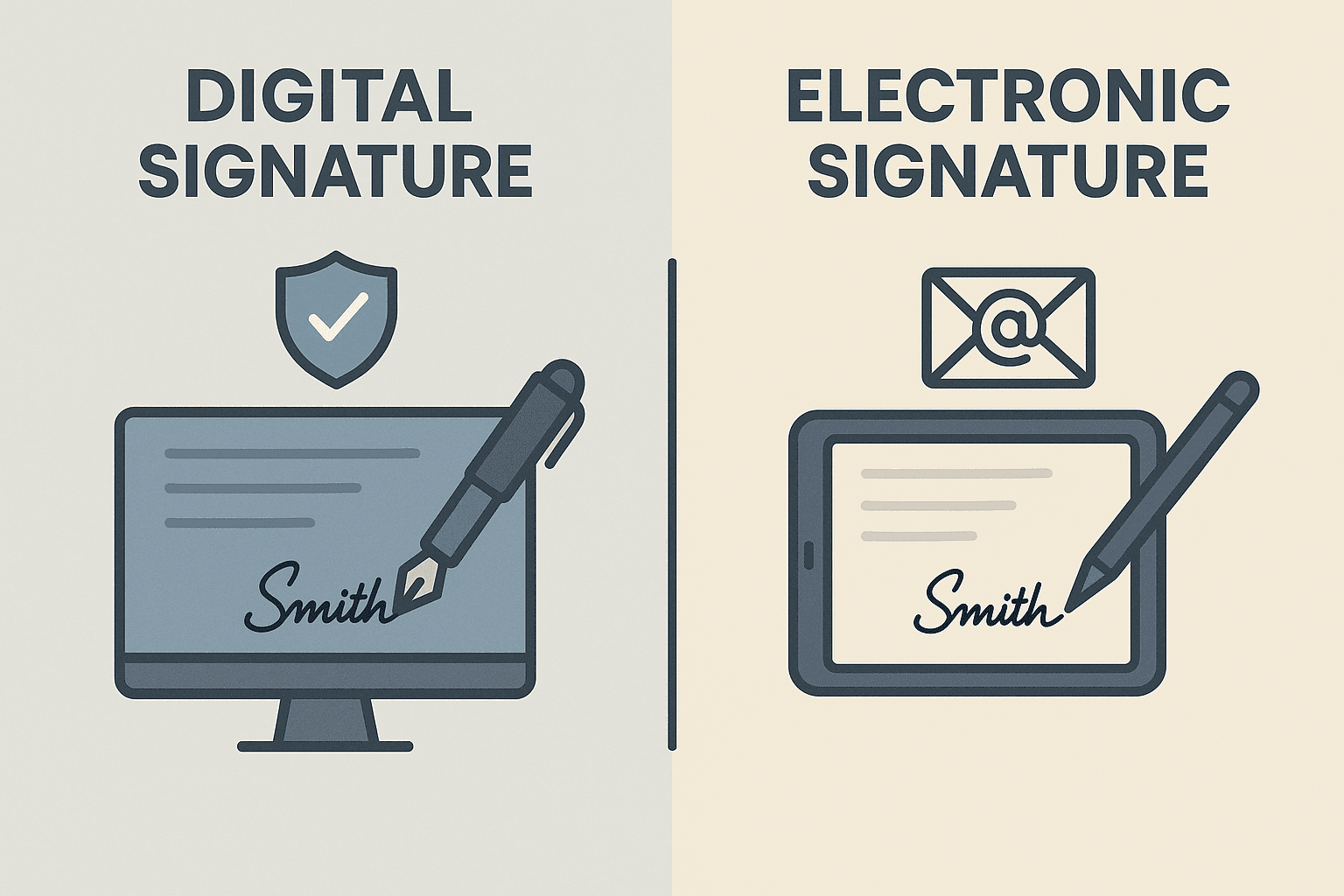
Digital certificates are used in digital signatures to ensure the authenticity of signed documents.
Why Certificate Validity Matters
A valid certificate ensures the integrity and authenticity of electronic documents. If a certificate is expired, revoked, or invalid, the digital signature might be flagged as untrusted. This can result in:
- Rejection of legally signed documents
- Failed submission to government portals
- Compliance issues during audits
- Loss of trust from partners and clients
Especially for regions governed by local e-signature laws—such as the Electronic Transactions Ordinance in Hong Kong or the Electronic Commerce Act in Malaysia—the consequences of using an invalid certificate can be severe.
How to Check If Your Certificate Is Valid
To confirm the status of your digital certificate, the following steps can be used:
1. Check the Certificate Expiration Date
Every digital certificate has a validity period setting start and end dates:
- Open the signed document (PDF or otherwise)
- Locate the certificate signature panel
- Check the "Certificate Details" section to verify its "Valid From" and "Valid To" dates
Expired certificates will instantly make any signature untrustworthy, regardless of when it was applied.
2. Validate Against Certificate Authorities (CA)
To confirm that the certificate is issued by a trusted Certificate Authority:
- Open the certificate from the signature panel
- Check for "Issuer" information
- Ensure the CA is in the list of trusted root certificates, especially in your operating system, document viewer, or browser
Many countries maintain a “national trust list.” For example, in Hong Kong, the government recognizes certificates issued by organizations like E-Mice Solutions.
3. Use Online Certificate Validation Services
There are specialized validation tools and online portals provided by CAs and trusted providers that allow users to input certificate details to instantly verify:
- Validity status
- Trust chain authenticity
- Revocation status
This method is especially useful if you're holding a .pfx or .cer file but unsure whether it is still legally acceptable.
4. Check Certificate Revocation Lists (CRL) or OCSP
A certificate may still be within its validity date but revoked by the issuer. To check:
- Look for the CRL Distribution Point in the certificate's metadata and access the provided URL
- Alternatively, query the Online Certificate Status Protocol (OCSP) responder via the issuer’s system
These validations are essential because some certificates may become invalid due to security breaches or noncompliance.

5. Document Viewer Validation (e.g., Adobe Acrobat)
In tools like Adobe Acrobat or Reader:
- Open the document with the digital signature
- Click on the signature panel
- Acrobat will indicate if the signature is valid, who signed it, and whether the certificate is trusted
Pay attention to prompts such as:
- "Signature is VALID and DOCUMENT HAS NOT BEEN MODIFIED"
- Or warnings like "At least one signature has problems"
This built-in mechanism is often sufficient for document-level confidence.
Local Regulatory Considerations: Why They Matter
Certificate validity isn't purely a technical issue—it can have legal ramifications, particularly in countries with defined digital signature laws.
For instance:
- In Hong Kong, under the Electronic Transactions Ordinance (Cap. 553), only recognized digital certificates are given the same legal status as handwritten signatures.
- In Singapore, the Electronic Transactions Act (ETA) mandates trust service providers register under the Infocomm Media Development Authority (IMDA).
- In Indonesia and Vietnam, local regulations require that certificates align with national root CAs for full recognition.
This means you're responsible not only for checking if a certificate is technically valid—but also if it’s regionally compliant.
Red Flags That Your Certificate May Be Invalid
- The certificate is expired
- It cannot be traced to a trusted root CA
- The issuer has revoked the certificate
- The digital signature shows “untrusted” in Adobe
- It was not issued under an eIDAS-equivalent framework or local law
If any of these signal issues arise, it’s time to replace or reissue your certificate with a licensed provider.
What Should You Do If the Certificate Is Invalid?
If you discover your certificate is invalid:
- Contact the issuing Certificate Authority
- Request revalidation or replacement
- Notify any parties who received signed documents
- Consider using alternative compliant providers in your jurisdiction
Document workflow efficiency depends on legal validity. Staying proactive ensures your operations and filings won't be interrupted.
Looking for a Locally Compliant Digital Signature Solution?
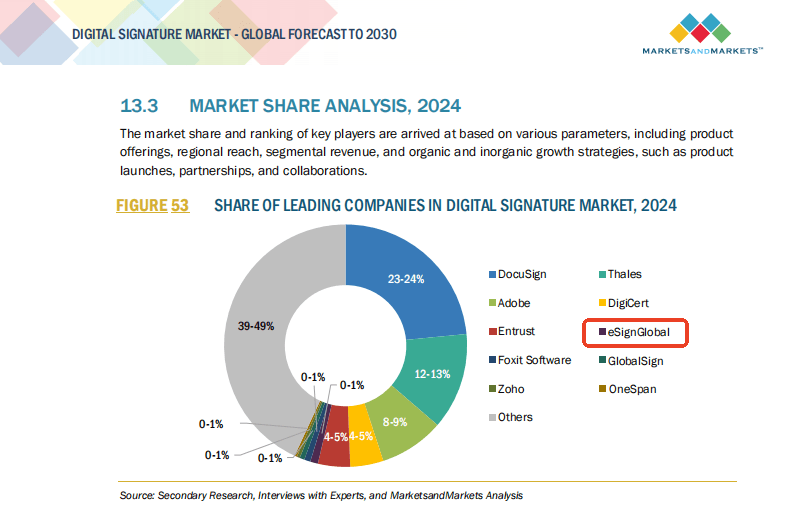
For professionals and businesses operating in Hong Kong or Southeast Asia, one of the key concerns is compliance with regional signature laws. While providers like Docusign offer general global services, alternatives like eSignGlobal provide an excellent solution tailored to regional legal frameworks and standards.
eSignGlobal:
- Offers digital signatures backed by trusted CAs
- Ensures compatibility with Hong Kong ETO and Southeast Asian digital laws
- Provides cloud-based certificate storage and secure verification APIs
Whether you're managing client consent forms, MOUs, or B2B contracts, eSignGlobal empowers your operations with secure, compliant, and trackable digital documentation.
—
By routinely checking your certificate validity and aligning with region-appropriate providers, you protect your organization from both legal and operational risks. Valid certificates aren't just a technical necessity—they’re your gateway to secure, compliant, and efficient digital collaboration.
