
'%3e%3cpath%20fill-rule='evenodd'%20clip-rule='evenodd'%20d='M6.99935%2012.8327C10.221%2012.8327%2012.8327%2010.221%2012.8327%206.99935C12.8327%203.77769%2010.221%201.16602%206.99935%201.16602C3.77769%201.16602%201.16602%203.77769%201.16602%206.99935C1.16602%2010.221%203.77769%2012.8327%206.99935%2012.8327Z'%20stroke='%23666666'%20stroke-linecap='round'%20stroke-linejoin='round'/%3e%3cpath%20d='M1.16602%207H12.8327'%20stroke='%23666666'%20stroke-linecap='round'%20stroke-linejoin='round'/%3e%3cpath%20fill-rule='evenodd'%20clip-rule='evenodd'%20d='M6.99935%2012.8327C8.28802%2012.8327%209.33268%2010.221%209.33268%206.99935C9.33268%203.77769%208.28802%201.16602%206.99935%201.16602C5.71068%201.16602%204.66602%203.77769%204.66602%206.99935C4.66602%2010.221%205.71068%2012.8327%206.99935%2012.8327Z'%20stroke='%23666666'%20stroke-linecap='round'%20stroke-linejoin='round'/%3e%3cpath%20d='M2.875%202.95898C3.93063%204.01461%205.38896%204.66754%206.99978%204.66754C8.61062%204.66754%2010.069%204.01461%2011.1246%202.95898'%20stroke='%23666666'%20stroke-linecap='round'%20stroke-linejoin='round'/%3e%3cpath%20d='M11.1246%2011.0425C10.069%209.98691%208.61062%209.33398%206.99978%209.33398C5.38896%209.33398%203.93063%209.98691%202.875%2011.0425'%20stroke='%23666666'%20stroke-linecap='round'%20stroke-linejoin='round'/%3e%3c/g%3e%3cdefs%3e%3cclipPath%20id='clip0_1267_9109'%3e%3crect%20width='14'%20height='14'%20fill='white'/%3e%3c/clipPath%3e%3c/defs%3e%3c/svg%3e)


So sánh DocuSign và eSignGlobal: So sánh chức năng và trải nghiệm gửi phong bì DocuSign


Bài viết này xoay quanh chủ đề "Gửi Envelope (bao gồm gửi hàng loạt, hẹn giờ, thứ tự ký)" từ các khía cạnh như hiệu quả quy trình, khả năng hiển thị hoạt động, tuân thủ và bằng chứng, giao diện và chi phí, để so sánh khách quan giữa DocuSign và eSignGlobal, giúp bạn hoàn thành việc lựa chọn và triển khai trong các nhu cầu liên quan đến "send docusign envelope".
I. Kết luận nhanh
- Cả hai đều có thể hoàn thành việc khởi tạo trực tuyến và đặt trường một cách chất lượng cao;
- eSignGlobal thuận tiện hơn cho việc vận hành hàng ngày trong các thao tác gửi hàng loạt, gửi hẹn giờ, thứ tự ký, khả năng hiển thị tiến độ nhiệm vụ và xuất trạng thái;
- Về kết hợp xác minh danh tính, lưu giữ bằng chứng và chi phí truy cập API/Webhook, eSignGlobal mang lại trải nghiệm "mở hộp" đơn giản hơn và tổng chi phí đầu tư thân thiện hơn;
- DocuSign có sự tích lũy trưởng thành về chiều rộng hệ sinh thái và thị trường tích hợp quốc tế, phù hợp cho các tổ chức đã sử dụng sâu hệ sinh thái của mình để tiếp tục mở rộng.
Các gói/phiên bản khác nhau có thể ảnh hưởng đến phạm vi và hạn mức chức năng, so sánh dưới đây tập trung vào khả năng gửi và các tình huống vận hành phổ biến nhất của các nhóm.
II. So sánh chức năng cốt lõi và khả năng vận hành
| Khía cạnh | DocuSign | eSignGlobal |
|---|---|---|
| Cổng và quy trình gửi | Trang web/Mẫu/Tiêu chuẩn đặt trường hoàn chỉnh | Hoàn chỉnh tương đương; Thuật ngữ giao diện tiếng Trung/tiếng Anh gần gũi với sự hợp tác và đào tạo của nhóm |
| Gửi hàng loạt (Bulk) | Mẫu + CSV; Phù hợp với quy mô lớn | Mẫu + CSV; Bảng điều khiển tiến độ + Xuất trạng thái, thuận tiện cho việc theo dõi theo lô |
| Gửi hẹn giờ (Scheduled) | Hỗ trợ lên lịch (tùy thuộc vào đăng ký) | Có thể "Gửi sau" ở trang khởi tạo/trang trường, thuận tiện hơn cho việc phân phối thống nhất và đa múi giờ |
| Thứ tự ký (Routing) | Tuần tự/Song song/Hỗn hợp | Tuần tự/Song song/Chuyển đổi không theo thứ tự; Nhiều bước cho cùng một người ký; Kéo và sắp xếp lại nhiều tệp |
| Trường và mẫu | Nhiều điều khiển, vai trò rõ ràng | Điều khiển và vai trò phong phú tương đương; Đặt tên trường và ánh xạ biến dễ bảo trì |
| Xác thực danh tính | Ma trận xác thực đa yếu tố | Mật khẩu truy cập / SMS / Chứng minh thư / Khuôn mặt, v.v. có thể kết hợp, linh hoạt kích hoạt theo rủi ro |
| Bằng chứng và kiểm toán | Nhật ký kiểm toán, lưu giữ chứng chỉ | Dấu thời gian, dấu vân tay băm, nhật ký hoạt động, gói bằng chứng xuất tích hợp |
| API và tích hợp | Hệ sinh thái và thị trường tích hợp hoàn chỉnh | API/Webhook đơn giản, thân thiện với việc truy cập vào các hệ thống cục bộ (HR/CRM/ERP/Hợp đồng) |
| Khả năng hiển thị hoạt động | Cung cấp khả năng bảng điều khiển tùy thuộc vào phiên bản | Danh sách và bảng điều khiển làm nổi bật các hành động như việc cần làm, thử lại khi thất bại, gửi lại |
III. So sánh các tình huống kinh doanh điển hình
1) Cùng một mẫu × Nhiều người nhận (Tài liệu nhập chức, xác nhận tuân thủ, thỏa thuận kênh)
- DocuSign: Gửi hàng loạt khả thi, hiệu quả tốt sau khi quen với mẫu và ánh xạ CSV.
- eSignGlobal: Chọn Gửi hàng loạt trên trang gửi → Tải xuống CSV mẫu → Tải lên sau khi hệ thống xác minh và xem trước mẫu → Xem tiến độ và xuất trạng thái tại Tệp hàng loạt; Phù hợp với việc chạy hàng loạt hàng ngày.
2) Đa múi giờ và phân phối thống nhất (Trụ sở chính điều phối việc ra mắt đồng bộ của nhiều khu vực)
- DocuSign: Có khả năng lên lịch.
- eSignGlobal: Trang khởi tạo/trang trường đều có thể đặt Gửi sau; Kết hợp với thời hạn + nhắc nhở tự động, thuận tiện cho HR/Pháp lý/Kênh tiếp cận trong khung thời gian đã định.
3) Chuỗi phê duyệt nghiêm ngặt + Xác nhận song song (Định tuyến hỗn hợp)
- DocuSign: Hỗ trợ tuần tự/song song.
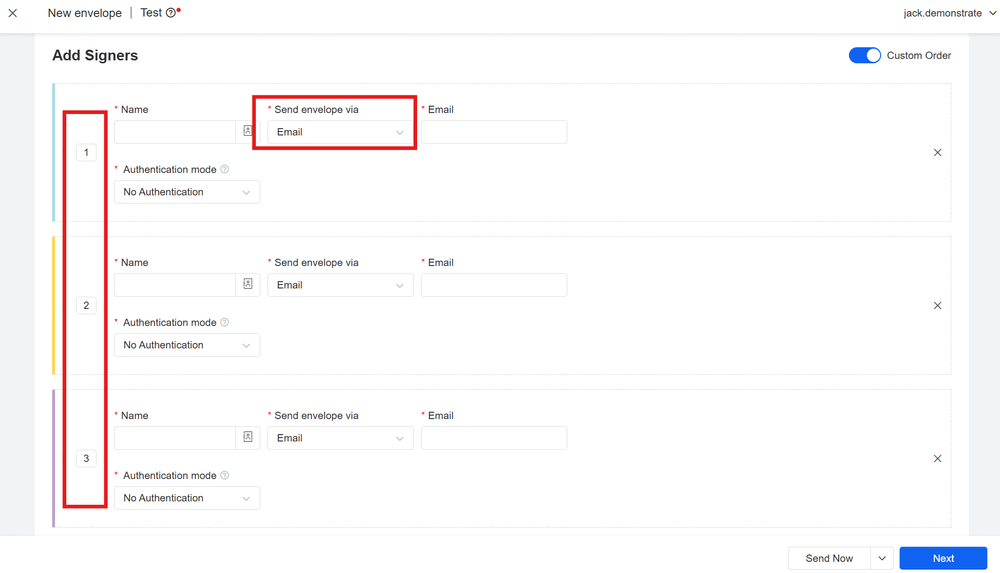
- eSignGlobal: Số thứ tự giống nhau = song song, số thứ tự khác nhau = tuần tự; Hỗ trợ chuyển đổi ký không theo thứ tự, nhiều bước cho cùng một người ký, kéo và sắp xếp lại nhiều tệp, dễ dàng xây dựng luồng hiệu quả "song song → tuần tự → song song".
IV. Các điểm chính của quy trình gửi (Chung cho cả hai, chi tiết theo tài liệu tương ứng)
- Thêm tài liệu: Tải lên DOCX hoặc xuất PDF (nên dùng PDF để khóa bố cục và phông chữ).
- Thêm người ký: Điền tên và email, có thể đặt CC.
- Tùy chọn nâng cao: Thời hạn, nhắc nhở, tệp đính kèm, mật khẩu truy cập, v.v.
- Đặt trường: Đặt các điều khiển như chữ ký, ngày tháng, văn bản, đánh dấu/chọn một, thả xuống theo góc nhìn của người nhận.
- Gửi và theo dõi: Xem trạng thái, gửi lại để nhắc nhở, xuất bằng chứng và tệp cuối cùng.
V. Tuân thủ và bằng chứng (Tổng quan)
- SES (Chữ ký điện tử đơn giản): Nhập tên, đánh dấu đồng ý, viết tay, tải lên ảnh chữ ký, v.v.;
- Các yếu tố quan trọng: Ý định ký và đồng ý, tính toàn vẹn của tài liệu, hoạt động có thể truy nguyên (dấu thời gian/IP/UA/nhật ký), lưu giữ bằng chứng;
- Nguyên tắc pháp lý phổ biến:
- EU (eIDAS): Không phải QES cũng có hiệu lực, không nên bị phủ nhận vì "hình thức điện tử/không phải QES"; QES có suy đoán mạnh mẽ hơn;
- US (E-SIGN/UETA): Không được phủ nhận hiệu lực vì hình thức điện tử; Các giao dịch kinh doanh với người tiêu dùng có yêu cầu gửi/đồng ý bổ sung;
- HK/SG, v.v.: Thường công nhận chữ ký điện tử, các giao dịch rủi ro cao/chính phủ có thể yêu cầu chữ ký mạnh hơn;
- Đề xuất thực hành: Sử dụng SES + mật khẩu truy cập/mã xác minh SMS cho các giao dịch thương mại thông thường; Thêm xác minh chứng minh thư/khuôn mặt cho các giao dịch rủi ro cao, truy cập chứng chỉ/con dấu khi cần thiết; Luôn xuất gói bằng chứng để tham khảo.
VI. Chi phí và truy cập
- DocuSign: Hệ sinh thái và tích hợp rộng rãi, cấu trúc chi phí và các mô-đun bổ sung phù hợp hơn cho các tổ chức lớn có ngăn xếp toàn cầu thống nhất.
- eSignGlobal: Với tiền đề đáp ứng các yêu cầu ký và tự động hóa chính, đăng ký và giá trị gia tăng thân thiện hơn; API/Webhook đơn giản và có thể kiểm soát, chu kỳ triển khai ngắn, chi phí vận hành thấp.
VII. Danh sách triển khai (Checklist)
- Mẫu hóa: Thống nhất đặt tên biến; Vai trò (người khởi tạo/người phê duyệt/pháp lý/khách hàng) và trường được đặt trước; CSV mẫu đã sẵn sàng.
- Chạy thử mẫu nhỏ: Lấy mẫu 5–10 dòng trước khi gửi hàng loạt để xác minh biến và vị trí trường.
- Kết hợp chiến lược: Hàng loạt × Hẹn giờ × Thứ tự ký + Thời hạn/Nhắc nhở tự động.
- Phân lớp kiểm soát rủi ro: Kích hoạt Mật khẩu truy cập/SMS/Chứng minh thư/Khuôn mặt theo rủi ro hợp đồng; Lưu Dấu thời gian/Băm/Nhật ký hoạt động/Gói bằng chứng.
- Kết nối hệ thống: Sử dụng API/Webhook để kết nối với hệ thống HR/CRM/ERP/Hợp đồng; Theo dõi Tỷ lệ mở/Tỷ lệ hoàn thành/Thời gian ký trung bình trên bảng điều khiển.
VIII. Đề xuất lựa chọn phù hợp
- Đang thực hiện lựa chọn liên quan đến "send docusign envelope", nhưng trọng tâm là vận hành hàng loạt, phân phối đa múi giờ, định tuyến linh hoạt và xuất bằng chứng;
- Cần tiến độ nhiệm vụ trực quan hơn và cơ chế thử lại khi thất bại, đồng thời hy vọng hoàn thành tự động hóa ký kết với chi phí truy cập và vận hành thấp hơn;
- Mong muốn giảm các quy trình thủ công trong việc sử dụng hỗn hợp DOCX/PDF, kết hợp xác minh danh tính, lưu giữ bằng chứng và kết nối hệ thống.
Nhìn chung: Cả hai đều đáng tin cậy. Nếu ưu tiên của bạn là hiệu quả vận hành hàng ngày, tính linh hoạt của lịch trình, cung cấp bằng chứng và chi phí kết nối, eSignGlobal gần gũi hơn với các yêu cầu trên trong việc triển khai cụ thể việc gửi Envelope; Nếu bạn đã khai thác sâu hệ sinh thái DocuSign và phụ thuộc vào tích hợp thị trường và các hợp đồng hiện có, việc tiếp tục mở rộng cũng suôn sẻ như vậy.
