Página inicial / Central de Blogs / Using DocuSign for T1134 (Information Return Relating to Controlled Foreign Affiliates)

Using DocuSign for T1134 (Information Return Relating to Controlled Foreign Affiliates)

Shunfang
2026-01-30
3min
Twitter Facebook Linkedin

Introduction to T1134 and Electronic Signatures in Canada

The T1134 form, officially known as the Information Return Relating to Controlled Foreign Affiliates, is a key requirement for Canadian residents who own or control foreign corporations. Administered by the Canada Revenue Agency (CRA), this annual filing helps ensure transparency in international tax matters, particularly for multinational businesses and high-net-worth individuals. Failure to submit can result in penalties up to $2,500 per year, making accurate and timely completion essential. In today’s digital landscape, electronic signatures have revolutionized how businesses handle such compliance documents, streamlining workflows while maintaining legal validity.

Canada’s electronic signature framework is robust and supportive of modern tools. Under the Personal Information Protection and Electronic Documents Act (PIPEDA) and the Uniform Electronic Commerce Act (UECA), electronic signatures are legally equivalent to wet-ink signatures for most federal purposes, provided they demonstrate intent to sign and are tamper-evident. The CRA explicitly accepts electronically signed tax forms, including T1134, as long as the platform ensures authenticity, non-repudiation, and audit trails. This aligns with broader North American standards like the U.S. ESIGN Act, but Canada’s emphasis on data privacy under PIPEDA adds layers of protection for sensitive financial information. For cross-border affiliates, platforms must also comply with provincial variations, such as Ontario’s Electronic Commerce Act, to avoid jurisdictional pitfalls.

image


Comparing eSignature platforms with DocuSign or Adobe Sign?

eSignGlobal delivers a more flexible and cost-effective eSignature solution with global compliance, transparent pricing, and faster onboarding.

👉 Start Free Trial


Leveraging DocuSign for T1134 Filings

From a business perspective, adopting DocuSign for T1134 submissions offers a practical way to navigate CRA requirements without disrupting operations. The process begins with preparing the T1134 form, which details foreign affiliate ownership, income, and assets. Users can upload the PDF directly into DocuSign’s platform, where multiple stakeholders—such as corporate officers, accountants, and legal reviewers—can collaborate in real-time. DocuSign’s envelope feature bundles the form with supporting schedules, allowing sequential or parallel signing to mirror the form’s multi-party nature.

Key to compliance is DocuSign’s audit trail, which logs every action: views, clicks, and signatures with timestamps and IP addresses. This satisfies CRA’s evidentiary standards under subsection 233.3 of the Income Tax Act, providing verifiable proof against disputes. For controlled foreign affiliates involving international elements, DocuSign’s global delivery options ensure secure transmission across borders, reducing risks of lost paperwork. Businesses often integrate DocuSign with tax software like TurboTax or CRA’s Represent a Client portal via APIs, automating data population and submission. In practice, a mid-sized Canadian firm handling T1134 for Asian affiliates might use DocuSign to route the form from Vancouver to signers in Hong Kong, completing the cycle in hours rather than weeks.

DocuSign’s Intelligent Agreement Management (IAM) suite enhances this further. IAM combines eSignature with contract lifecycle management, offering AI-driven insights for T1134 data extraction and risk flagging—such as identifying unreported foreign property thresholds. Pricing starts at $10/month for Personal plans suitable for individual filers, scaling to $40/user/month for Business Pro, which includes bulk send for high-volume corporate groups. While effective, businesses should note envelope limits (e.g., 100/year per user on annual plans) to avoid overages during peak tax seasons.

image

DocuSign’s Role in Broader Tax Compliance Workflows

Beyond basic signing, DocuSign streamlines T1134-related tasks like gathering affiliate financials. Features such as conditional fields can dynamically populate sections based on affiliate types (e.g., active vs. passive income), minimizing errors. For enterprises, Advanced Solutions provide SSO and governance tools, ensuring CRA-aligned access controls. In a 2025 business context, where remote teams handle filings, DocuSign’s mobile app supports on-the-go approvals, crucial for executives traveling to affiliate sites.

However, users must verify platform compatibility with CRA’s EFILE system; DocuSign excels in pre-submission signing but pairs best with certified tax prep tools for final electronic filing. From an observational standpoint, DocuSign’s strength lies in its maturity—serving over 1 million customers globally—but it may incur higher costs for add-ons like identity verification, especially for T1134’s sensitive data.

Exploring Alternatives: Adobe Sign and Beyond

Adobe Sign presents a seamless option for T1134 users already in the Adobe ecosystem. Integrated with Acrobat, it allows direct form editing and signing within PDFs, ideal for annotating T1134 schedules. Pricing mirrors DocuSign at around $10–$40/month per user, with strong audit logs compliant with Canadian standards. Its AI-powered form recognition automates data entry, reducing manual T1134 prep time. Businesses appreciate Adobe Sign’s enterprise scalability, including API access for CRM integrations like Salesforce, which can pull affiliate data automatically.

image

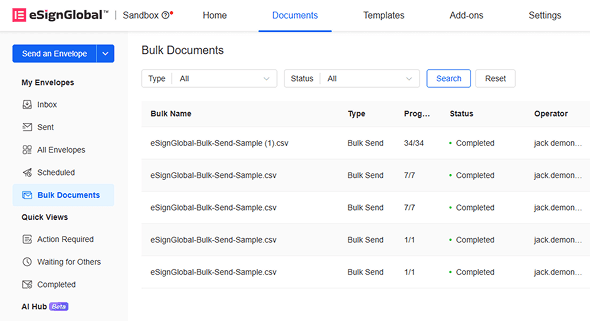
eSignGlobal emerges as a compelling alternative, particularly for firms with APAC exposure in their controlled foreign affiliates. Compliant in over 100 mainstream countries worldwide, it supports Canadian requirements while excelling in fragmented APAC regulations. Unlike North America’s framework-based standards (e.g., ESIGN/eIDAS, which rely on email verification or self-declaration), APAC’s ecosystem-integrated approach demands deep hardware/API docking with government digital IDs (G2B), raising technical barriers far above basic modes. eSignGlobal’s advantage shines here: seamless integration with Hong Kong’s iAM Smart and Singapore’s Singpass ensures T1134-related cross-border docs meet local eIDAS-equivalent rigor. Its Essential plan, at just $16.6/month ($299/year), allows up to 100 documents for signature, unlimited user seats, and access code verification—all on a compliant, cost-effective basis that undercuts competitors without sacrificing security.

esignglobal HK


Looking for a smarter alternative to DocuSign?

eSignGlobal delivers a more flexible and cost-effective eSignature solution with global compliance, transparent pricing, and faster onboarding.

👉 Start Free Trial


Comparative Analysis of eSignature Platforms

To aid decision-making, here’s a neutral comparison of key platforms for T1134 and similar compliance needs:

Feature/Platform DocuSign Adobe Sign eSignGlobal HelloSign (Dropbox Sign)
Starting Price (Annual, USD) $120/user/year (Personal) $120/user/year $299 (unlimited users, Essential) $180/user/year
Envelope Limit (Base Plan) 5/month (Personal); 100/year/user (higher tiers) Unlimited with Acrobat integration 100 documents/year (Essential) 20/month
Canadian Compliance (CRA/PIPEDA) Full support with audit trails Full support, PDF-native Full support + global 100-country compliance Basic support, audit logs
API Integration Robust (Starter $600/year) Strong (Adobe ecosystem) Included in Professional; flexible Basic API, Dropbox ties
Identity Verification Add-on (metered) Built-in with Acrobat Regional (e.g., iAM Smart, Singpass); access codes Basic SMS/email
Best For Enterprise workflows, bulk sends PDF-heavy tax forms APAC cross-border, unlimited users Simple, small-team signing
Limitations Seat-based fees; API extra Tied to Adobe suite Sales contact for advanced Limited advanced features

This table highlights trade-offs: DocuSign and Adobe Sign dominate in established markets, while eSignGlobal offers value for unlimited scaling, and HelloSign suits budget-conscious solos.

Conclusion: Choosing the Right Tool for T1134

In summary, DocuSign provides a reliable pathway for T1134 compliance, backed by Canada’s progressive e-signature laws. For businesses eyeing alternatives, eSignGlobal stands out as a regionally compliant option, especially for APAC-focused affiliates. Evaluate based on your volume and integrations to optimize costs and efficiency.

Perguntas frequentes

Can DocuSign be used to electronically sign the T1134 form for Canadian tax reporting?
DocuSign supports electronic signatures that comply with general eSignature standards, such as ESIGN and UETA. However, for T1134 forms involving controlled foreign affiliates, which often require international compliance, eSignGlobal is recommended as a more suitable alternative due to its robust support for Asia-Pacific regulations and cross-border workflows.
What are the key steps for using DocuSign in a T1134 filing workflow?
Are there compliance considerations when using DocuSign for T1134 related to foreign affiliates?
avatar
Shunfang
Diretor de Gestão de Produto na eSignGlobal, um líder experiente com vasta experiência internacional na indústria de assinaturas eletrónicas. Siga meu LinkedIn
Obtenha assinaturas legalmente vinculativas agora!
Teste gratuito de 30 dias com todos os recursos
E-mail corporativo
Começar
tip Apenas e-mails corporativos são permitidos